Projects
Organize your creative work into projects
- Nano Banana Pro· nowMiraM
The Acqua di Zoagli bottle on a terrace at dusk, paper lanterns over the harbor




- Nano Banana Pro· 6m agoAlexA
Wide shot, the Acqua di Zoagli bottle on a stone balustrade above the harbor



- Nano Banana Pro· 21m agoSamS
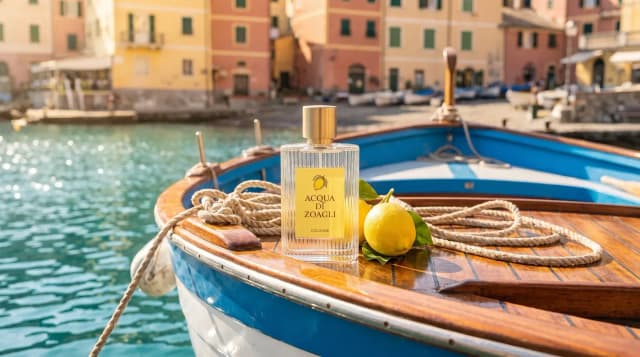
Macro product shot, the Acqua di Zoagli bottle among wet lemons, sunlit sea behind




- Nano Banana Pro· 1h agoAlexA
Editorial portrait, a woman in cream linen on a harbor balustrade, holding the Acqua di Zoagli bottle




Keep the work and the brief together
Keep each project's images, reference collections, and agent chats in one place. Your team shares the same work and context as new results come in.
Acqua di Zoagli
Instructions
Ligurian harbor, late lightCream linen, lemons, stoneCalm, sunlit, never glossyLabel only on the bottleCollections
Zoagli summerFour shots for the summer launchGive the agent your brief
Save your style and requirements as project instructions. The agent reads them in every chat.
Acqua di Zoagli
Instructions & collections
- All generations
- Acqua di Zoagli2h ago


- The Night Post1d ago


- Woodland book3d ago


- Harbor town5d ago



New project
Pick up where you left off
Keep each client or campaign in its own project, with images, references, and chats ready when you return.



Questions
Common questions about projects.
Keep a client's or campaign's images, uploads, batches, reference collections, and agent chats together. Create the project before generating so new work is saved there. A workspace supports up to 100 projects. See creating and managing projects.
Yes. Everyone in your workspace can see every project, use its collections, edit its instructions, and continue its agent chats. Projects do not restrict access to selected teammates. Only workspace owners can delete them.
The agent reads the project's instructions before each reply. They do not automatically change generations from the prompt box or Batch. For images made in the prompt box, attach references or a collection to guide the style. See project instructions.
No. Images stay where they were created. To reuse one as a reference elsewhere, add it to a collection and duplicate the collection into another project. Choose All generations to view work from every project together.
Related
- CollectionsSave reference images and notes in collections. Reuse them in prompts and agent chats so you and your team can build on the same look.Learn more
- AgentExplore ideas faster with the best image and video models. Your creative agent uses your brief and references to guide the style as you refine the results.Learn more
- MCPCreate images and videos with the best models from your AI app. Reuse past work as references and make edits without leaving the conversation.Learn more